![Untitled design (1)-Aug-01-2022-12-37-27-80-PM.png]](https://help.syscloud.com/hs-fs/hubfs/Untitled%20design%20(1)-Aug-01-2022-12-37-27-80-PM.png?height=40&name=Untitled%20design%20(1)-Aug-01-2022-12-37-27-80-PM.png)
Yes, you can connect any number of Salesforce accounts to the SysCloud backup application. To connect a new Salesforce account, follow the below steps:
You must be an admin with the required permissions to authorize the cloud connection. For Salesforce, make sure the account you use has the required permissions to authorize third-party app access. If you do not have the required permissions, contact the account holder or the appropriate admin to authorize the connection.
Step 1: Log in to your SysCloud backup account.
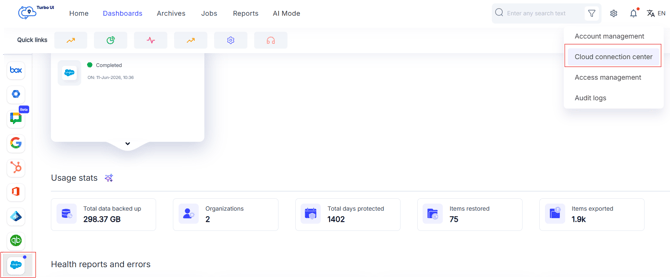
Step 2: Click on the settings icon in the upper-right corner of the page. Select Cloud Connection Center from the drop-down.
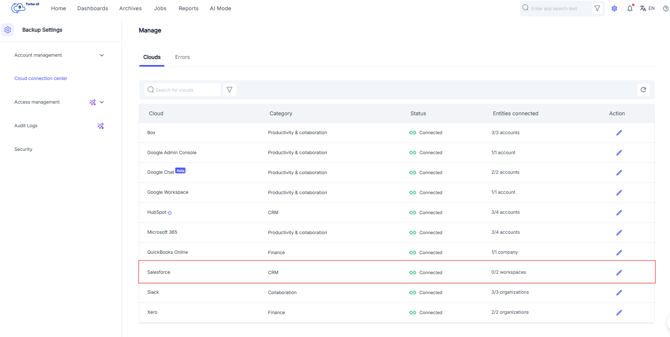
Step 3: On the Cloud Connection Center page, locate Salesforce and click the Edit connection icon under the Action column.
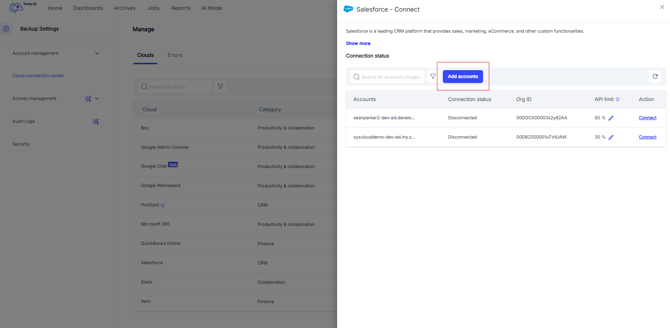
Step 4: Click on Add accounts. Choose the account you want to connect to SysCloud and grant access.
Step 5: Provide credentials for your salesforce account that you want to connect and confirm the backup. Click "Next."
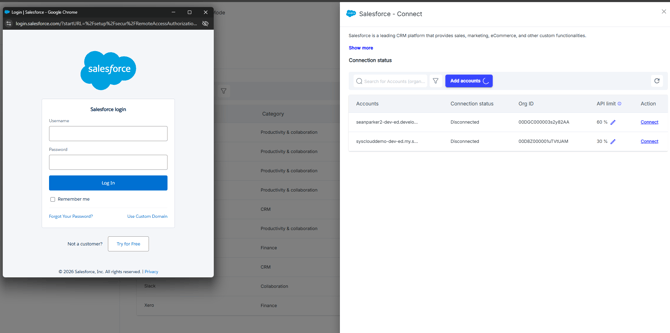
After authorization is completed, the new Salesforce account will be connected to the SysCloud backup application.
This will connect the new Salesforce account to the SysCloud backup application. To add this account to a backup job, follow the steps in this article.