![Untitled design (1)-Aug-01-2022-12-37-27-80-PM.png]](https://help.syscloud.com/hs-fs/hubfs/Untitled%20design%20(1)-Aug-01-2022-12-37-27-80-PM.png?height=40&name=Untitled%20design%20(1)-Aug-01-2022-12-37-27-80-PM.png)
Step 1: Log in to SysCloud using your admin credentials.
Step 2: Click on the settings icon in the upper-right corner of the page. Select Cloud Connection Center from the drop-down.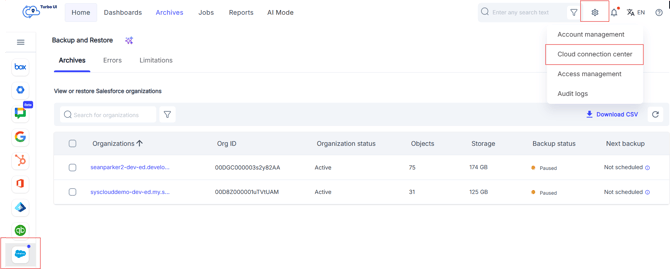
Step 3: Click on the pencil icon under the "Action" column for Salesforce.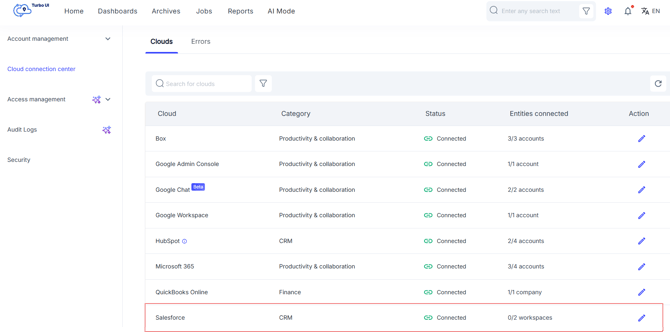
Step 4: Click Connect for the account that is currently in a Disconnected status and that you want to reconnect to SysCloud.
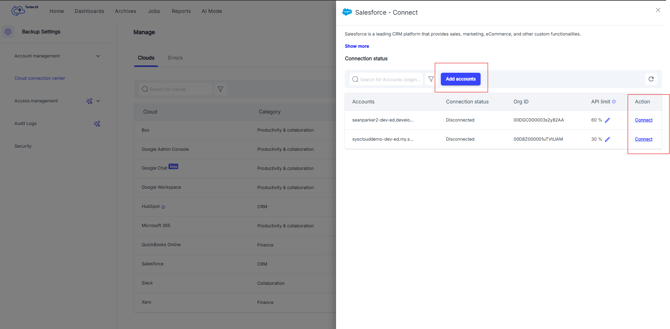
Step 5: Enter the required Salesforce admin credentials and authorize SysCloud to access the Salesforce account.
This will initiate the reconnection process and will take you back to the cloud connection page.