![Untitled design (1)-Aug-01-2022-12-37-27-80-PM.png]](https://help.syscloud.com/hs-fs/hubfs/Untitled%20design%20(1)-Aug-01-2022-12-37-27-80-PM.png?height=40&name=Untitled%20design%20(1)-Aug-01-2022-12-37-27-80-PM.png)
Here are the steps to disconnect your HubSpot account from SysCloud.
Step 1: Log in to the SysCloud application.
Step 2: Click on the settings icon in the upper-right corner of the page. Select Cloud Connection Center from the drop-down.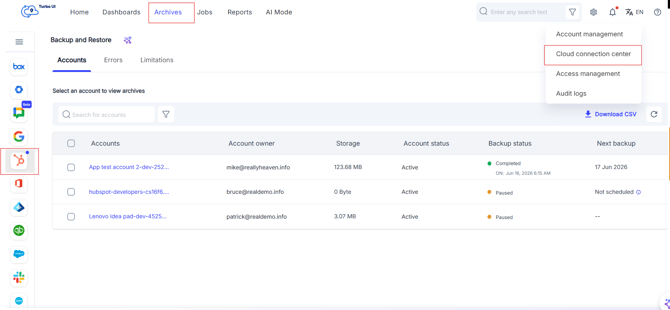
Step 3: Click on the pencil icon next to HubSpot.
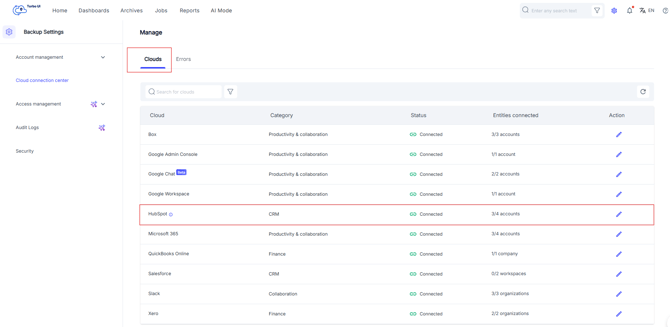
Step 4: Click on "Disconnect" to disconnect your account from SysCloud.
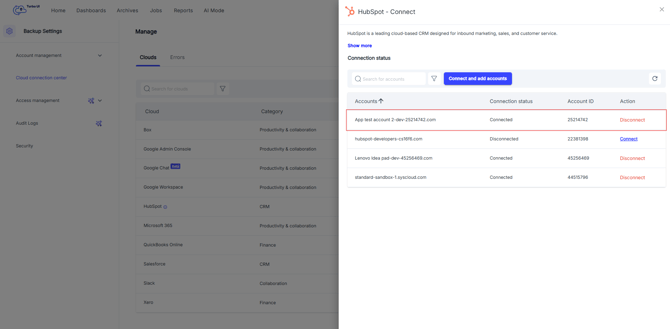
Disconnecting your HubSpot account will pause the backups for that account. SysCloud will not be able to back up new or updated HubSpot data until the account is reconnected.