![Untitled design (1)-Aug-01-2022-12-37-27-80-PM.png]](https://help.syscloud.com/hs-fs/hubfs/Untitled%20design%20(1)-Aug-01-2022-12-37-27-80-PM.png?height=40&name=Untitled%20design%20(1)-Aug-01-2022-12-37-27-80-PM.png)
Here are the steps to disconnect your Slack account from SysCloud.
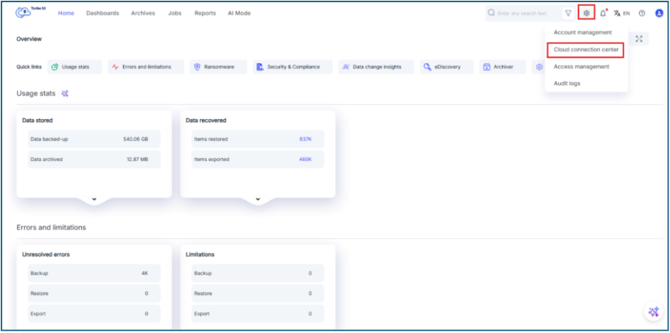
Step 1: Go to Settings -> Cloud connection center
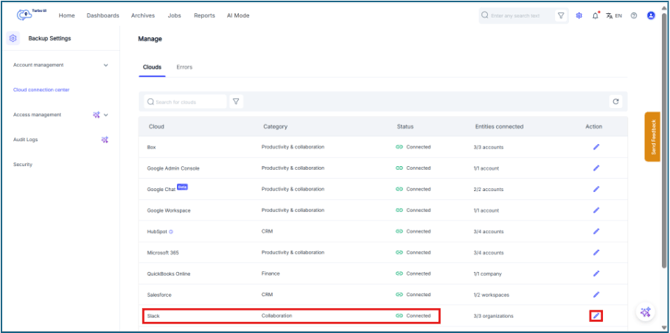
Step 2: Click on the pencil icon next to Slack
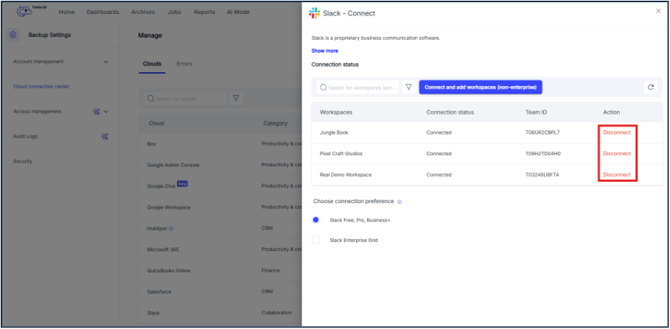
Step 3: Click on "Disconnect" to disconnect your slack workspaces from SysCloud.
Step 4: In the Disconnect window that appears click Disconnect again.
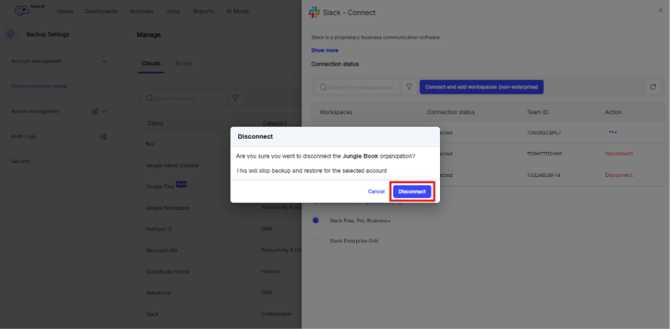
Your workspace is now disconnected, and the incremental backups will be paused for the same.