![Untitled design (1)-Aug-01-2022-12-37-27-80-PM.png]](https://help.syscloud.com/hs-fs/hubfs/Untitled%20design%20(1)-Aug-01-2022-12-37-27-80-PM.png?height=40&name=Untitled%20design%20(1)-Aug-01-2022-12-37-27-80-PM.png)
Follow the steps below to perform an on-demand backup for your Xero organization.
Step 1: Log in to SysCloud using your admin credentials.
Step 2: Click Archives from the top navigation menu and select Xero from the left-side cloud navigation. In the Archives tab, click the Xero organisation which you want to conduct an on-demand backup for and click “Backup now.”
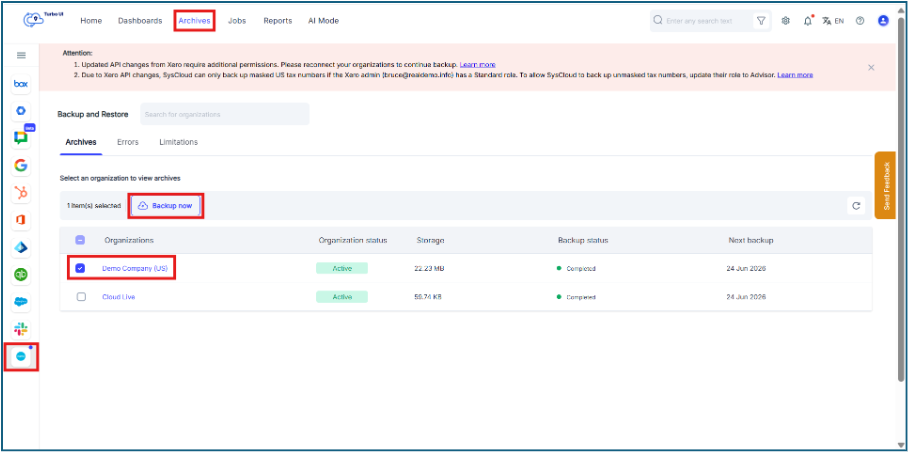
You can initiate an on-demand backup for only one Xero organization at a time. When a single organization is selected, the Backup now button is enabled. If multiple organizations are selected, the Backup now button is disabled. After starting an on-demand backup for one organization, you can select another organization and initiate another on-demand backup.
Step 3: In the confirmation dialog box, click “Backup now” to confirm backup.
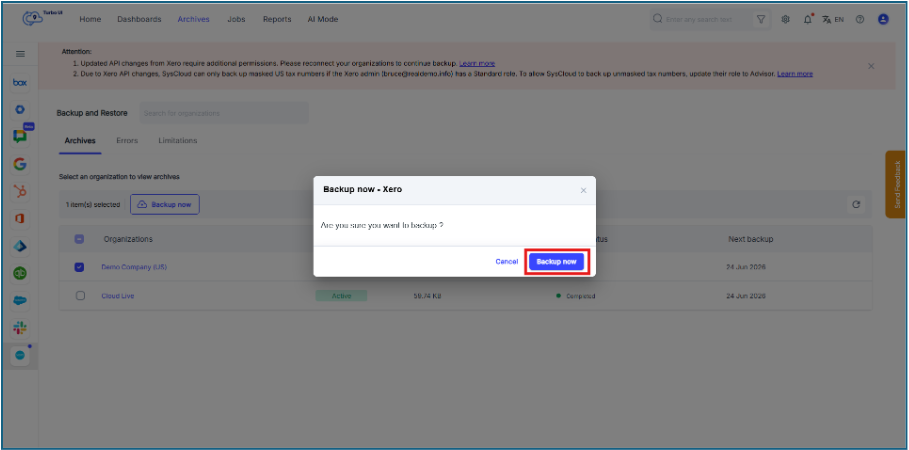
After the on-demand backup starts, you can track the backup status from the Backup status column in the Xero archive list.