![Untitled design (1)-Aug-01-2022-12-37-27-80-PM.png]](https://help.syscloud.com/hs-fs/hubfs/Untitled%20design%20(1)-Aug-01-2022-12-37-27-80-PM.png?height=40&name=Untitled%20design%20(1)-Aug-01-2022-12-37-27-80-PM.png)
This article explains how to export Salesforce metadata types from the SysCloud backup application.
Step 1: Log in to SysCloud application using your admin credentials.
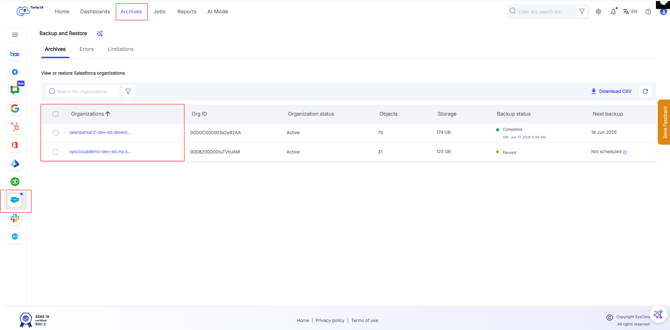
Step 2: Navigate to Archives from the main dashboard. The Archives tab displays the list of Salesforce organizations available in the backup archive. Select the organization you want to export the metadata types from.
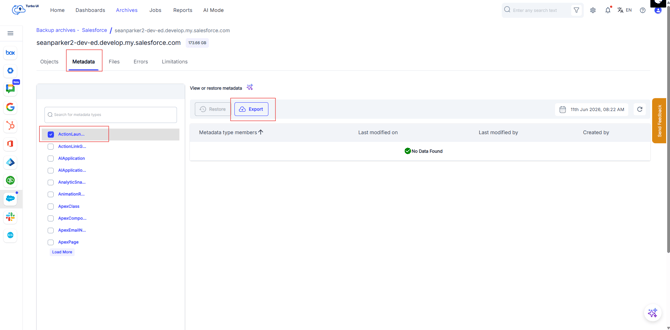
Step 3: Navigate to Metadata tab and select the metadata types you want to export by selecting the checkbox next to it.
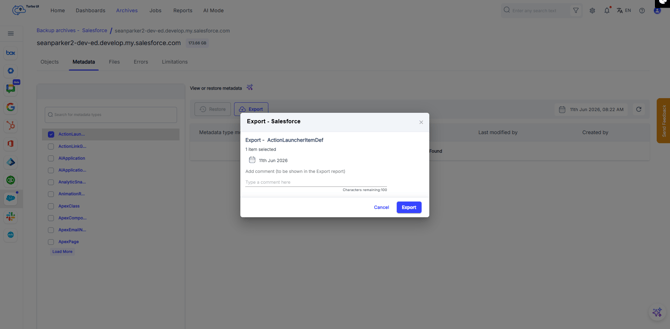
Step 4: Add comments (if any) to be shown in the export report, and click the “Export” button.
After the export is initiated, go to Reports > Export report to view the export status and download the file after the export is completed.
The export download link will be active for 7 days. After the link expires, you must initiate the export again to generate a new download link.
The exported data is downloaded as a ZIP file. The files inside the ZIP depend on the type of Salesforce data exported:
- All backed-up objects are exported in CSV format.
- Content Version files are exported in their original file format.
- Metadata is exported in XML format.