![Untitled design (1)-Aug-01-2022-12-37-27-80-PM.png]](https://help.syscloud.com/hs-fs/hubfs/Untitled%20design%20(1)-Aug-01-2022-12-37-27-80-PM.png?height=40&name=Untitled%20design%20(1)-Aug-01-2022-12-37-27-80-PM.png)
Follow the below steps:
Step 1: Select 'Reports' and select 'Compliance report' under Google Workspace or Microsoft 365.
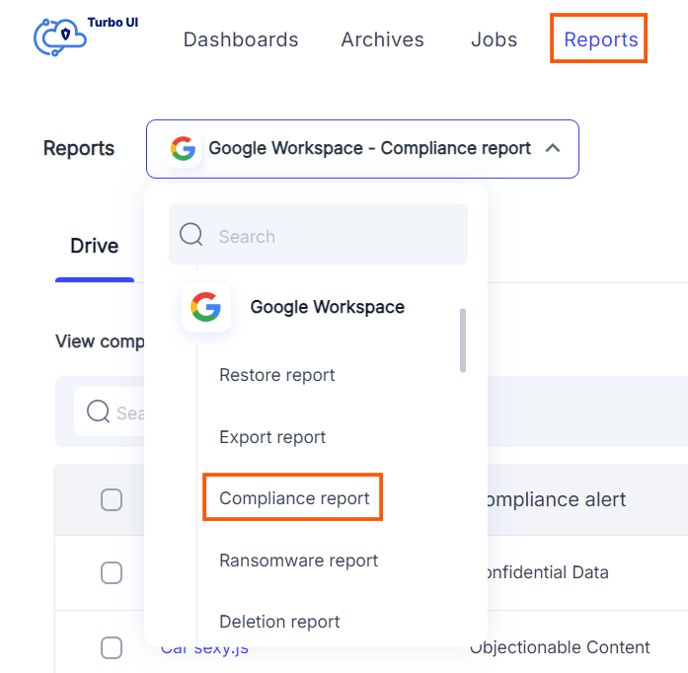
Step 2: You will be able to view a list of compliance violations identified by SysCloud. To take appropriate action, click the checkbox next to the alert.
Choose an action:
- Transfer Ownership: Adjust sharing settings by:
- Transfer ownership of the file to an admin. This allows the admin to review the document's content and decide on appropriate actions.
- Restore the file ownership to the original owner if one or more ownership transfers were performed on the selected file(s).
- Restore the file ownership to the original owner if one or more ownership transfers were performed on the selected file(s).
- Remove Sharing: Adjust sharing settings by:
- Remove all sharing permissions: This will revoke all sharing permissions for the file, allowing only the file owner to retain access.
- Remove link sharing: This action will revoke all access to the file granted via link sharing, leaving only direct access intact.
- Removing external domain sharing: This action will revoke all access granted to users from external domains, whether through direct sharing or link sharing.
- Quarantine Document: Remove all file sharing and transfer the ownership to the SysCloud account owner.
- Dismiss: If the alert is not a compliance violation, you can dismiss it.