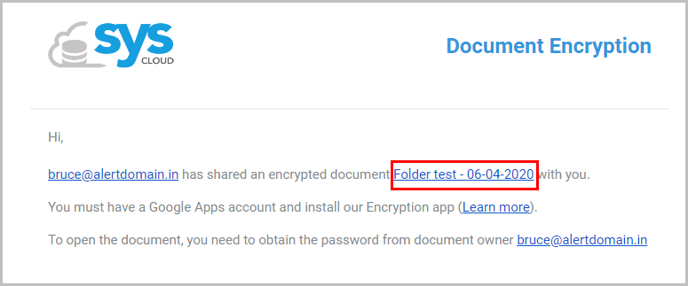
1. Click on the file/folder link in your email.
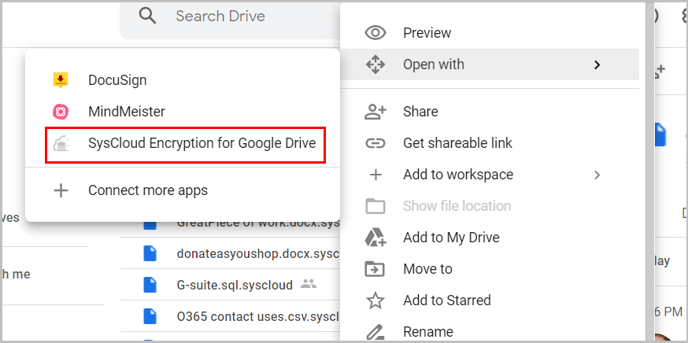
2. Right-click on the file/folder and select “Open with → SysCloud Encryption for Google Drive.”
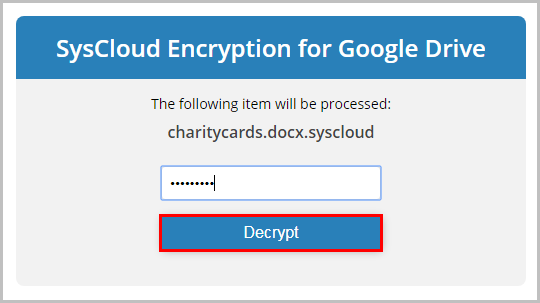
3. Enter the password for unlocking the file and click “Decrypt.”
![Untitled design (1)-Aug-01-2022-12-37-27-80-PM.png]](https://help.syscloud.com/hs-fs/hubfs/Untitled%20design%20(1)-Aug-01-2022-12-37-27-80-PM.png?height=40&name=Untitled%20design%20(1)-Aug-01-2022-12-37-27-80-PM.png)
1. Click on the file/folder link in your email.
2. Right-click on the file/folder and select “Open with → SysCloud Encryption for Google Drive.”
3. Enter the password for unlocking the file and click “Decrypt.”