![Untitled design (1)-Aug-01-2022-12-37-27-80-PM.png]](https://help.syscloud.com/hs-fs/hubfs/Untitled%20design%20(1)-Aug-01-2022-12-37-27-80-PM.png?height=40&name=Untitled%20design%20(1)-Aug-01-2022-12-37-27-80-PM.png)
If you are an end-user and would like to decrypt a file shared with you, click here.
If you are an administrator, follow these steps to decrypt a file through the SysCloud Application:
- Log in to the SysCloud Application with your account credentials.
- Click “Encryption.”

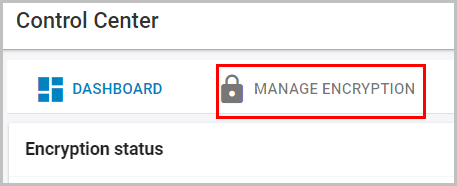
- Click “MANAGE ENCRYPTION.”
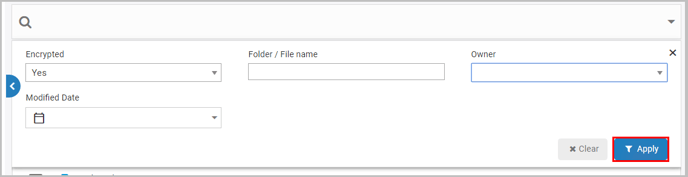
- Click on the search bar, enter the details about the file, and click “Apply.”
- Check the file(s) to be decrypted.

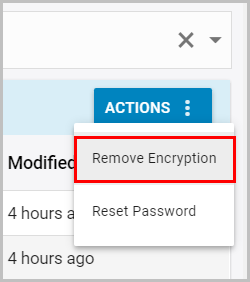
- Click “ACTIONS” and select “Remove Encryption.”
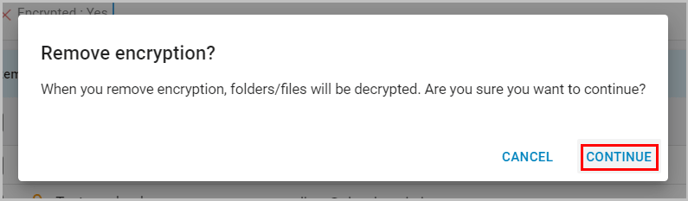
- Click “CONTINUE.”
- Click “LINK” to view more details.

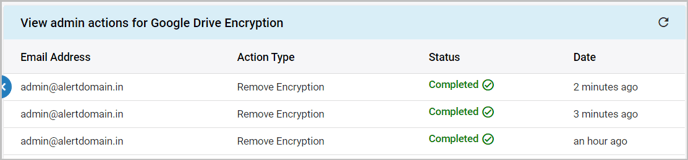
- You can check the status of the decrypted file(s) in the action report.