![Untitled design (1)-Aug-01-2022-12-37-27-80-PM.png]](https://help.syscloud.com/hs-fs/hubfs/Untitled%20design%20(1)-Aug-01-2022-12-37-27-80-PM.png?height=40&name=Untitled%20design%20(1)-Aug-01-2022-12-37-27-80-PM.png)
Turbo UI
- Step 1: Log in to your SysCloud account.
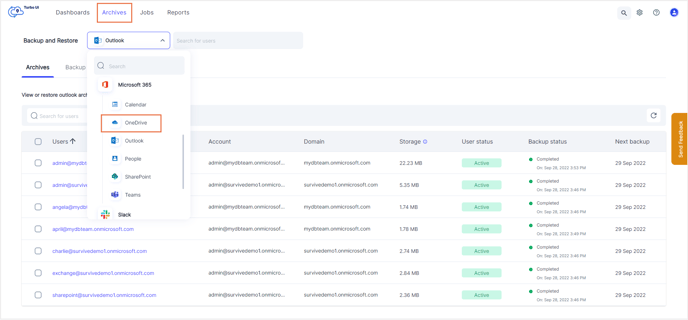
- Step 2: Navigate to Archives and select OneDrive from the Backup and Restore drop-down.
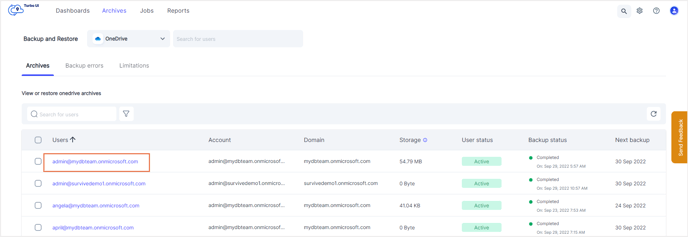
- Step 3: Choose the user whose Drive file or files you want to export.
- Step 4: Choose the required snapshot date and click Apply. Select the OneDrive files you want to export (You can select the entire Drive or multiple files at once).
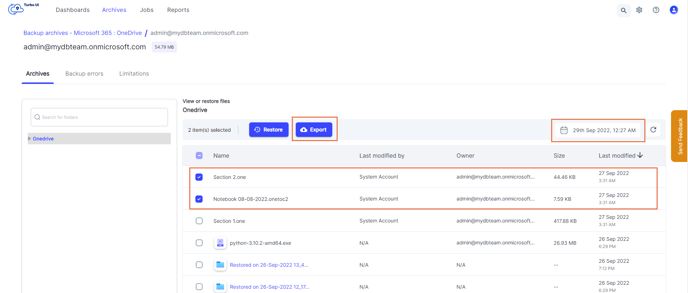
- Step 5: Click the “Export” option on the top.
- Step 6: Add any comments if needed. This will be displayed in the export report. Click “Export”.
.png?width=688&height=449&name=Export%20pop-up%20(1).png)
Note: The time taken to generate the download link depends on the number of files and their size.