![Untitled design (1)-Aug-01-2022-12-37-27-80-PM.png]](https://help.syscloud.com/hs-fs/hubfs/Untitled%20design%20(1)-Aug-01-2022-12-37-27-80-PM.png?height=40&name=Untitled%20design%20(1)-Aug-01-2022-12-37-27-80-PM.png)
- Log in to the SysCloud Application with your account credentials.
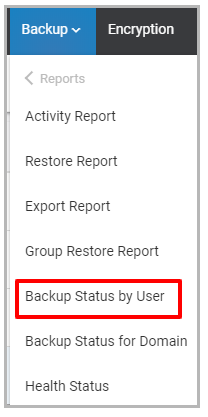
- Click “Backup”→“Reports”→“Backup Status by User.”
The user summary report provides the following information:
- Username: The username of the account holder in your domain
- Account Status: The account status option displays whether the user is Active, Suspended, Deleted, or added as an Alias
- Apps: The apps option show the applications backed up for the user
- Storage: The total storage used by the user's backup archive
- Last Backup: The last backup shows the date and time of the previous backup for the user
- Progress: The percentage of data backed up for the user
- Backup Status: The backup status for the user account: active or stopped