![Untitled design (1)-Aug-01-2022-12-37-27-80-PM.png]](https://help.syscloud.com/hs-fs/hubfs/Untitled%20design%20(1)-Aug-01-2022-12-37-27-80-PM.png?height=40&name=Untitled%20design%20(1)-Aug-01-2022-12-37-27-80-PM.png)
Follow these steps to configure the eDiscovery add-on:
- Step 1: Enable the eDiscovery Add-On
- While creating or editing a backup job, navigate to the Configure add-ons section.
- Select the checkbox next to eDiscovery.
- Step 2: Configure eDiscovery Settings
- Click on Configure next to the eDiscovery add-on.
- A side tray will open with the following options:
- Metadata Search: Enable this to index all metadata fields of files, emails, chats, and records for future searches.
- Content Search: Enable this to index the actual content of files, emails, records, or chat messages, making full text searchable in eDiscovery.
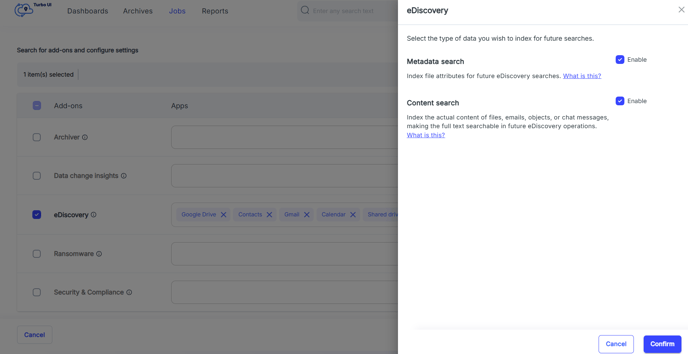
- Step 3: Confirm Settings
- Once the required options are enabled, click Confirm and Start backup.