![Untitled design (1)-Aug-01-2022-12-37-27-80-PM.png]](https://help.syscloud.com/hs-fs/hubfs/Untitled%20design%20(1)-Aug-01-2022-12-37-27-80-PM.png?height=40&name=Untitled%20design%20(1)-Aug-01-2022-12-37-27-80-PM.png)
Follow the steps below to disconnect a cloud service from your SysCloud account:
- Enter your admin credentials and Login with SysCloud application.
- Click on the Settings icon located at the top right corner of the dashboard.
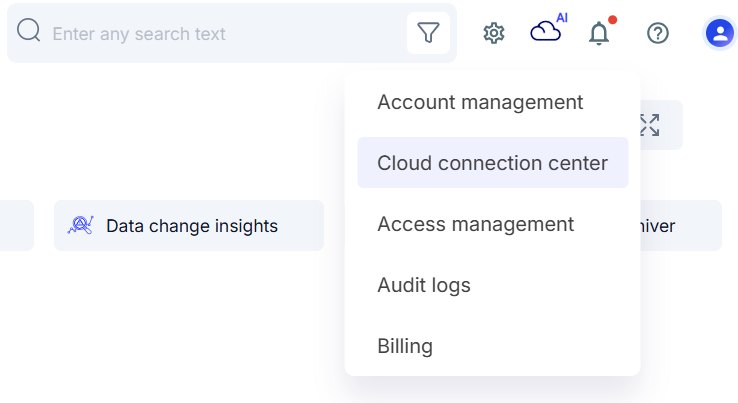
- From the drop-down menu, select Cloud Connection Center.
- In the Cloud Connection Center, view the list of connected cloud services.
- Identify the cloud you want to disconnect from the list.
- Click on the cloud service you wish to disconnect.
- Click the Disconnect or Remove option associated with that cloud.
- Confirm the disconnection in the pop-up that appears.
Once confirmed, the selected cloud will be removed from your SysCloud account.