![Untitled design (1)-Aug-01-2022-12-37-27-80-PM.png]](https://help.syscloud.com/hs-fs/hubfs/Untitled%20design%20(1)-Aug-01-2022-12-37-27-80-PM.png?height=40&name=Untitled%20design%20(1)-Aug-01-2022-12-37-27-80-PM.png)
Follow these steps to raise an exception for your violation:
- Log in to the SysCloud Security and Backup Application.
- Click on “Safety, Security & Compliance” and select “Violence”.
- Select the required policy to view the violations associated with it.
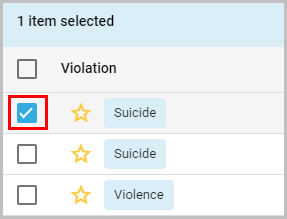
- Select the violation that you want to raise an exception.
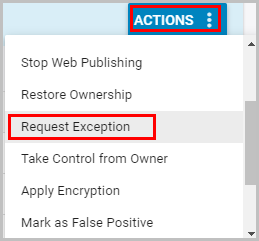
- Click on the “ACTIONS” button and select “Request Exception.”
- Type in your reason for the exception and click on “CONTINUE.”
-1.png?width=688&name=CLICK%20CONTINUE%20(2)-1.png)
Your exception request will be added to the violation.