![Untitled design (1)-Aug-01-2022-12-37-27-80-PM.png]](https://help.syscloud.com/hs-fs/hubfs/Untitled%20design%20(1)-Aug-01-2022-12-37-27-80-PM.png?height=40&name=Untitled%20design%20(1)-Aug-01-2022-12-37-27-80-PM.png)
Applies to: Users (observed); can affect any object
What this error means
Google wants the administrator to verify their identity again before allowing this sensitive action.
Why this error occurs
Google applies a recent-authentication requirement (RAPT - Reauth Proof Token) to sensitive admin operations such as creating users, resetting passwords and changing admin role assignments. Because the connection uses the admin's own OAuth credentials, that requirement applies to the stored token: once it no longer satisfies the check, Google rejects an otherwise valid call with invalid_rapt rather than an ordinary 401. Only the customer can complete the sign-in challenge. OBSERVED in the dev account on the user object.
Resolution
1. Open SysCloud and reconnect the Google Admin Console cloud by Adding the account again.
2. Go to settings and go to the Cloud connection center
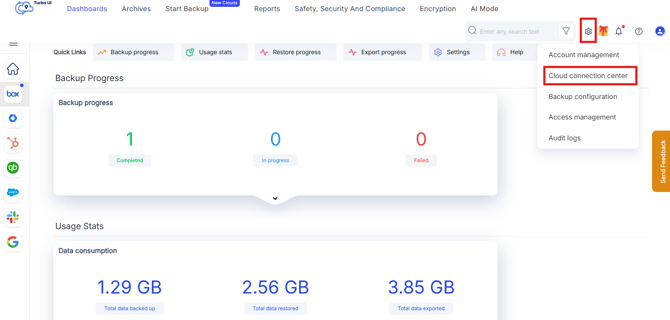
3. Edit the connection of Google Admin Console
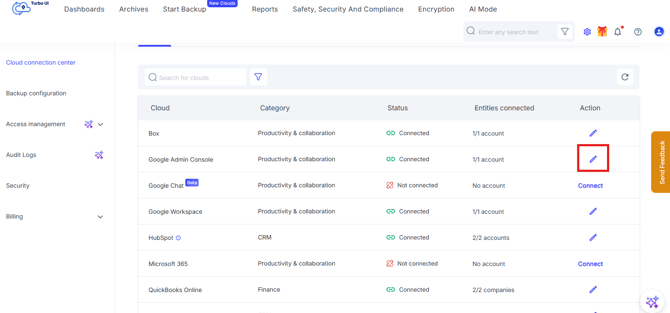
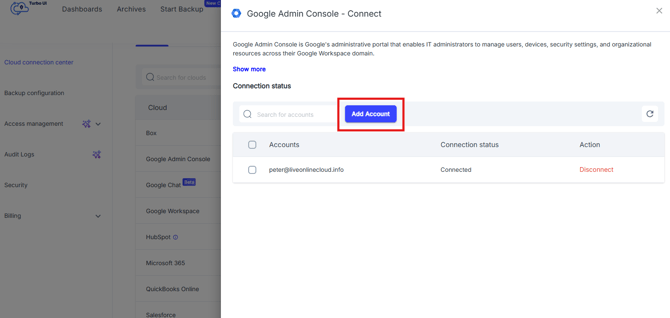
4. From the Side-tray Add Account again for reconnection.
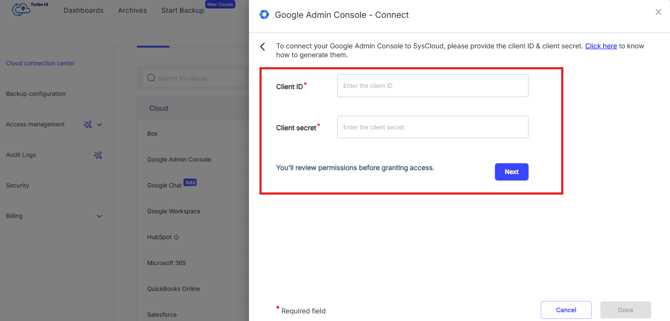
5. Complete the Google sign-in prompt using the connected administrator account by using Client ID and Client secret.
Refer to the below help articles to create client credentials to backup admin console
1. Create a Google Cloud Project & Add scopes
2. Create the OAuth client credentials
6. Complete the 2-Step Verification challenge when prompted.
7. Retry the failed restore items.
Verify the resolution
Confirm that the affected users (observed); can affect any object appears with the expected configuration in Google Admin console and that the retried operation completes without the same error.
If the error continues
Confirm that the listed prerequisite or configuration change applies to the correct destination account. If the error continues, contact SysCloud Support with the error code, job ID, affected object, raw Google message, and failure time.