![Untitled design (1)-Aug-01-2022-12-37-27-80-PM.png]](https://help.syscloud.com/hs-fs/hubfs/Untitled%20design%20(1)-Aug-01-2022-12-37-27-80-PM.png?height=40&name=Untitled%20design%20(1)-Aug-01-2022-12-37-27-80-PM.png)
Applies to: Any affected Google Admin Console object
What this error means
The OAuth client information is incorrect or no longer valid.
Why this error occurs
SysCloud connects to Google using an OAuth client, and Google rejected the credentials for that client. What you can do depends on who owns the client. If you supplied your own OAuth client when connecting, the fix is in your Google Cloud project. If you connected using SysCloud's standard connection, the client belongs to SysCloud and there is nothing to change on your side.
Resolution
If you set up your own OAuth client when connecting
- In the Google Cloud console, go to APIs & Services > Credentials and open the OAuth client used for this connection.
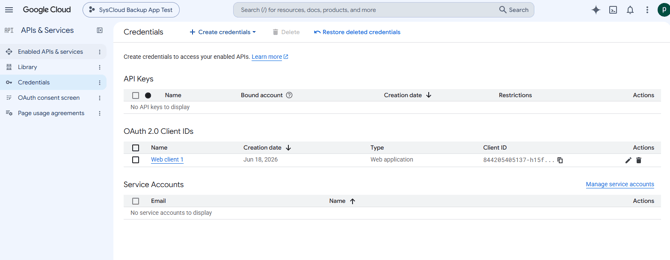
- Confirm the client still exists and has not been deleted or disabled.
- Compare the client ID and client secret against the values entered in SysCloud. If the secret was rotated or regenerated, the old value no longer works.
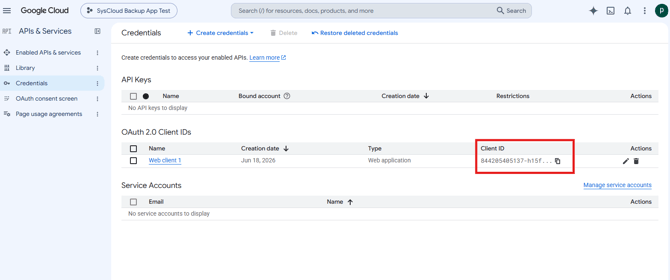
- Confirm the authorized redirect URI matches the one SysCloud requires.
- Correct anything that does not match, then reconnect the Google Admin Console cloud in SysCloud.
If you use SysCloud's standard connection
There is nothing to change in your account. Contact SysCloud Support so the connection can be checked from our side.
Verify the resolution
Confirm the Google Admin Console cloud shows as connected in SysCloud, then run the operation that failed.
If the error continues
If your own OAuth client is configured correctly, or you use SysCloud's standard connection, contact SysCloud Support with the error code, job ID, affected object, and time of failure.