![Untitled design (1)-Aug-01-2022-12-37-27-80-PM.png]](https://help.syscloud.com/hs-fs/hubfs/Untitled%20design%20(1)-Aug-01-2022-12-37-27-80-PM.png?height=40&name=Untitled%20design%20(1)-Aug-01-2022-12-37-27-80-PM.png)
Here are the steps to update your domain's super administrator email address in SysCloud.
Step 1: Login to SysCloud application.
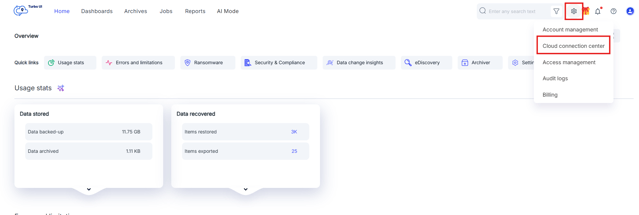
Step 2: Navigate to 'Cloud connection center' page by clicking on the setting (gear) icon on the top right and selecting 'Cloud connection center'.
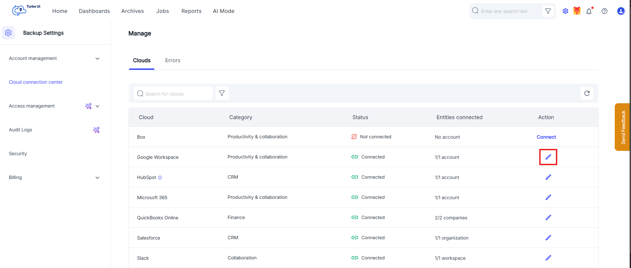
Step 3: Click on the edit (pencil) icon next to 'Google Workspace'
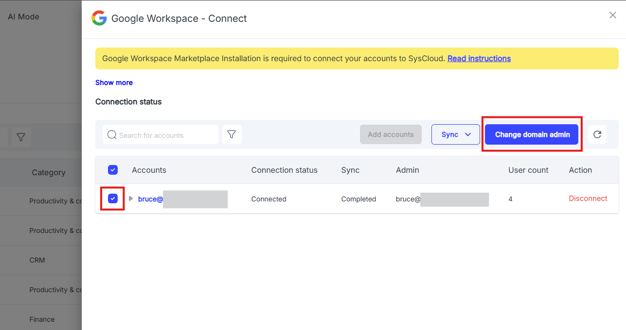
Step 4: Select the account for which the domain administrator details should be updated and click on 'Change domain admin'
Step 5: In the pop-up, enter the new administrator's email address.
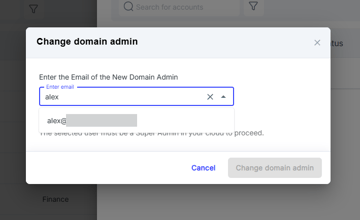
The email address will be auto filled if the admin is synced to SysCloud. If the user is not synced, please run an on-demand user sync and re-try changing the admin. Click here to know how to run an on-demand user sync.