![Untitled design (1)-Aug-01-2022-12-37-27-80-PM.png]](https://help.syscloud.com/hs-fs/hubfs/Untitled%20design%20(1)-Aug-01-2022-12-37-27-80-PM.png?height=40&name=Untitled%20design%20(1)-Aug-01-2022-12-37-27-80-PM.png)
Follow the steps to perform an entity-level restore for Google Classroom
Step 1: Log in to SysCloud using your admin credentials.
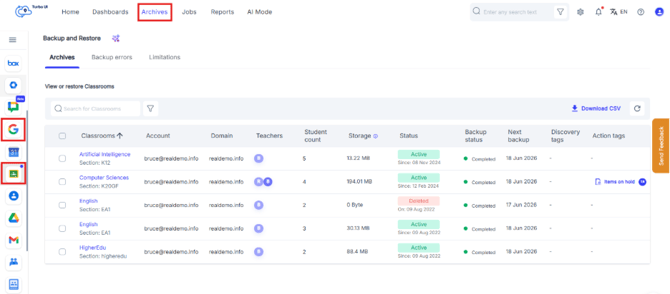
Step 2: Click the Archives tab in the top navigation bar. From the left panel, select the Google Workspace logo, and then click the Google Classroom logo to view the archived Google Classroom backup data.
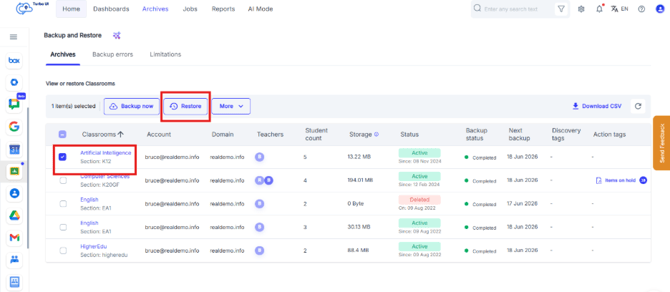
Step 3: Select the Classroom you want to restore, and then click Restore.”
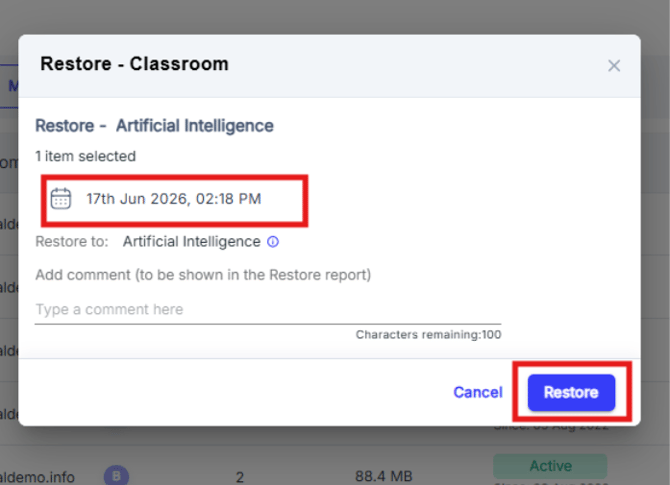
Step 4: In the restore pop-up, select the snapshot date you want to restore. Add an optional comment to be displayed in the restore report, and then click Restore.
For item-level restore, verify the snapshot date before initiating the restore. The selected snapshot determines the backup version from which the item will be restored.
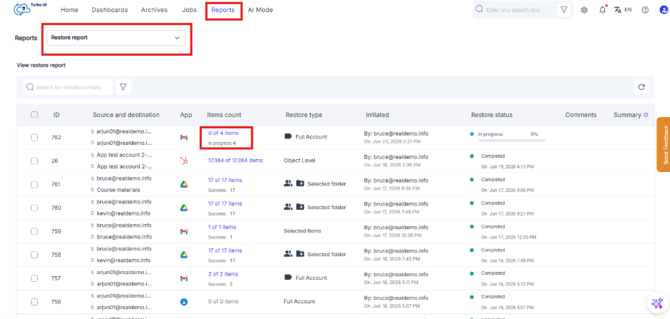
Step 5: To view the restore status, go to Reports > Restore Reports.