![Untitled design (1)-Aug-01-2022-12-37-27-80-PM.png]](https://help.syscloud.com/hs-fs/hubfs/Untitled%20design%20(1)-Aug-01-2022-12-37-27-80-PM.png?height=40&name=Untitled%20design%20(1)-Aug-01-2022-12-37-27-80-PM.png)
- Step 1: Log in to SysCloud using your admin credentials.
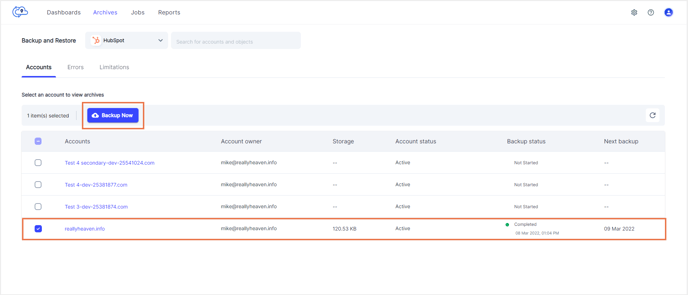
- Step 2: Go to the HubSpot backup archives.
- Step 3: Select the accounts you want to back up from the list of accounts by checking the box next to the account names.
- Step 4: Click on “Backup Now” and confirm the backup job in the pop-up dialogue box that appears.