![Untitled design (1)-Aug-01-2022-12-37-27-80-PM.png]](https://help.syscloud.com/hs-fs/hubfs/Untitled%20design%20(1)-Aug-01-2022-12-37-27-80-PM.png?height=40&name=Untitled%20design%20(1)-Aug-01-2022-12-37-27-80-PM.png)
| App | HubSpot |
| Error | Workflow scope missing |
Before you begin
- Confirm that the HubSpot account has access to Workflows.
- Make sure you can sign in to the HubSpot account connected to SysCloud.
Important: Workflows must be available in the HubSpot account. If the current subscription does not include Workflows, reconnecting HubSpot will not enable the feature.
To resolve the error
Step 1: Confirm access to Workflows
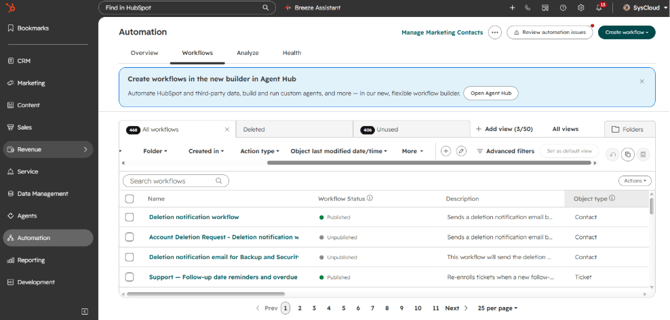
- Sign in to HubSpot and confirm that Workflows is available for the affected account.
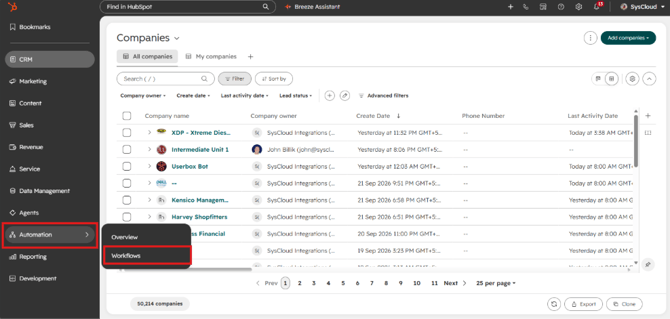
- If Workflows is not available, review the HubSpot subscription and enable or upgrade access to the feature before retrying the backup.
Step 2: Reconnect HubSpot to SysCloud
- If the feature is available, reconnect the HubSpot account to SysCloud and complete the authorization. For detailed steps, see How can I reconnect my HubSpot account?
Step 3: Retry the backup
- After reconnecting HubSpot, initiate an on-demand backup and confirm that SysCloud can access Workflows.
If the error continues
If Workflows is available and the error continues after reconnecting HubSpot, contact SysCloud Support for further investigation.