![Untitled design (1)-Aug-01-2022-12-37-27-80-PM.png]](https://help.syscloud.com/hs-fs/hubfs/Untitled%20design%20(1)-Aug-01-2022-12-37-27-80-PM.png?height=40&name=Untitled%20design%20(1)-Aug-01-2022-12-37-27-80-PM.png)
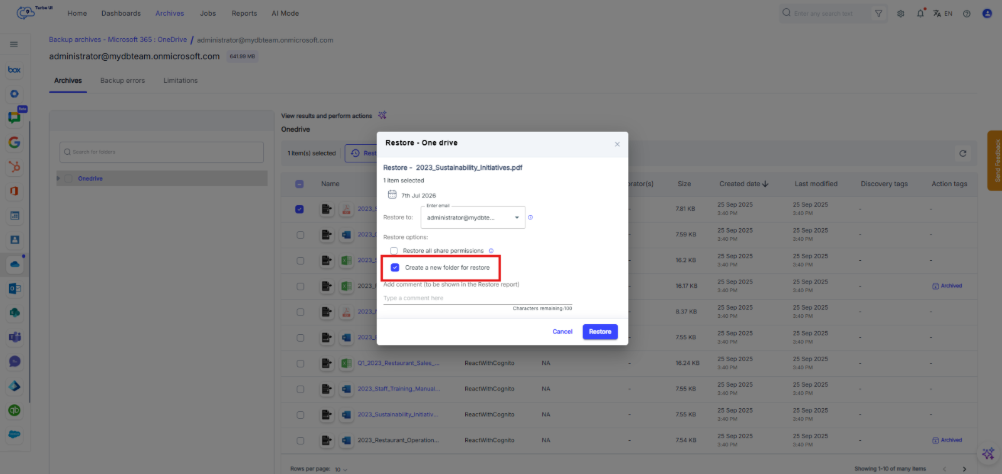
Yes. It is recommended to select Create a new folder when restoring OneDrive files or folders.
When this option is selected, SysCloud restores the selected OneDrive data into a newly created folder in the user’s OneDrive account. This makes it easier to identify, review, and validate the restored files without mixing them with the existing files in the original location. The custom folder name is in “Restore on DD-MMM-YYYY HH_MM_SS” format.
Why is creating a new folder recommended?
Creating a new folder is recommended because it helps you:
- Locate restored files easily- Restored files are grouped in a separate folder, so you do not have to search through the user’s existing OneDrive folder structure to find them.
- Avoid confusion with existing files- If the original folder already contains files with the same or similar names, restoring to a new folder helps clearly separate restored data from current data.
- Review the restored data before moving it- You can verify the restored files first, and then move them manually to the required location in OneDrive if needed.
- Reduce the risk of overwriting or mixing data- Restoring to a new folder keeps the restored copy separate from the active OneDrive content. This is useful when you are restoring older versions of files or recovering deleted data.
What happens if I select “Create a new folder”?
If you select Create a new folder, SysCloud creates a new folder in the user’s OneDrive account and restores the selected files or folders into that folder.
After the restore is complete, the user or admin can open OneDrive, review the restored folder, and move the restored files to the required location if needed.
What happens if I clear the “Create a new folder” checkbox?
If you clear this option, SysCloud restores the selected files to their original folder location in OneDrive.
Use this option only when you want the files to be placed back in their original location and you are sure that restoring them there will not create confusion with existing files.
Recommendation
For most restore scenarios, keep Create a new folder selected. This is the safer and more organized option because it allows you to review the restored data separately before deciding whether to move it back to the original folder location.
If you are restoring files to their original location, review the selected restore items carefully before confirming the restore. This helps avoid confusion between existing files and restored files, especially when restoring older versions or previously deleted files.